
Key takeaways
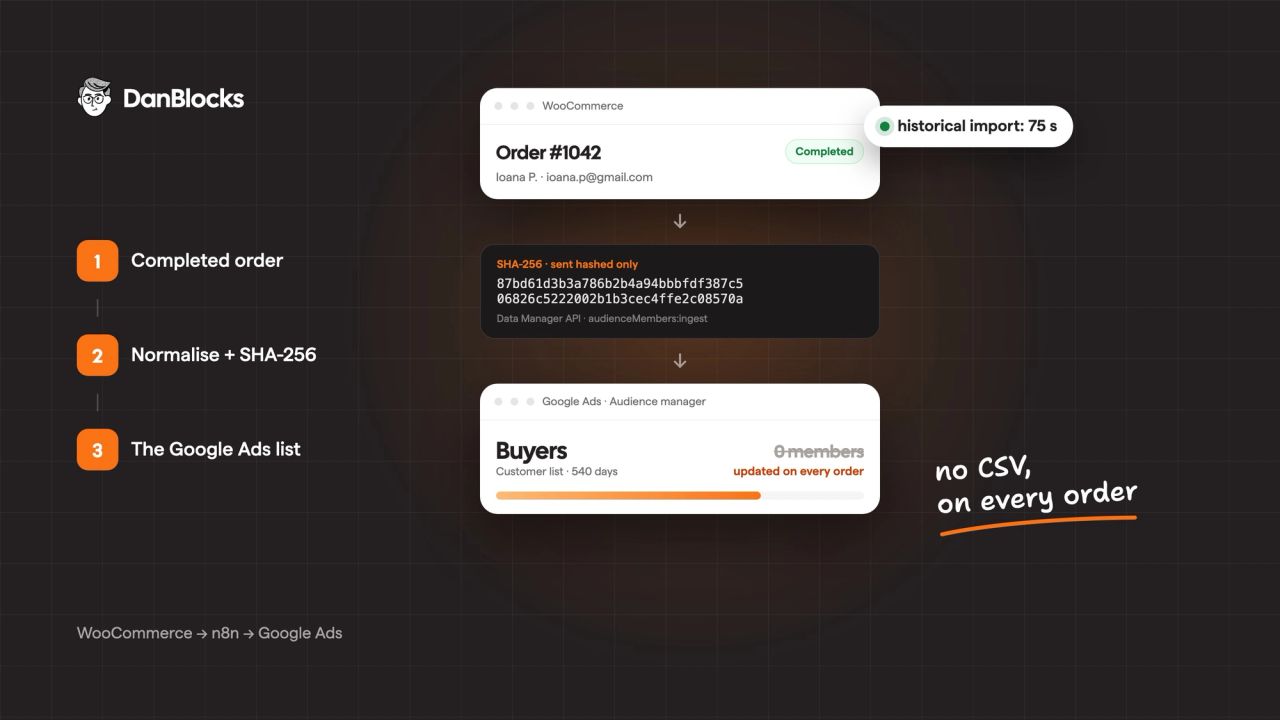
- Every WooCommerce order marked Completed is normalized, hashed with SHA-256 and sent by an n8n workflow to the buyers list in Google Ads.
- Since April 1, 2026, Customer Match uploads through the old Google Ads API fail for integrations that weren't already using them. For any new integration, the way in is the Data Manager API.
- A one-off historical import brings in customers from the last 540 days, the maximum membership duration of a Customer Match list.
- Hashing doesn't exempt you from GDPR: consent signals have to reflect real consent, and your privacy policy has to say the data goes to Google.
The buyers list in the Google Ads account had 0 members. Not because the store had no customers, but because the list had been uploaded once, by hand, from a CSV, and then forgotten. The members had expired. A month before Black Friday, the Performance Max campaigns were starting without knowing who had already bought from the store.
The store is an online shop for natural products in Romania, with daily orders and returning customers. Below is the whole process: the architecture, the steps, the normalization rules, what broke on the first test and what your privacy policy has to say.
What Customer Match is, in short
Customer Match is the Google Ads feature that lets you upload customer data (email, phone, name and address) to build an audience list. Google matches the hashed data against Google accounts and shows ads to list members on Search, the Shopping tab, YouTube, Gmail and the Display Network. In Performance Max and Demand Gen, the list works as an audience signal.
For an online store, the buyers list is the strongest first-party signal you can give the algorithm. It says exactly who has already bought, not who has visited a page.
Why a manually uploaded CSV isn't enough
| Problem | What happens |
|---|---|
| Members expire | The maximum membership duration is 540 days. A CSV uploaded once empties itself. |
| New customers are missing | Someone who buys today only joins the list at the next upload, if anyone remembers to do it. |
| Wrong formatting throws no error | Google accepts badly normalized data but can't match it. You only find out from the match rate. |
| Data travels in plain text | A CSV export with emails and phone numbers ends up on laptops and in inboxes. |
Automation fixes all four: the list updates on every order, membership refreshes with every new purchase, and the data leaves n8n hashed.
Why the Data Manager API and not the Google Ads API
Google launched the Data Manager API in December 2025 as a single entry point for first-party data. Since April 1, 2026, Customer Match requests to OfflineUserDataJobService and UserDataService in the Google Ads API fail with the error CUSTOMER_NOT_ALLOWLISTED_FOR_THIS_FEATURE for developer tokens (now replaced by Google Cloud projects) that sent no Customer Match requests between October 1, 2025 and March 31, 2026.
In short: if you start a new integration now, you build it on the Data Manager API. The rest of the Google Ads API (campaigns, reporting, bidding) is not affected.
What you need to know about the Data Manager API:
- OAuth 2.0 authentication, with the scope
https://www.googleapis.com/auth/datamanager. - The endpoint for lists:
POST https://datamanager.googleapis.com/v1/audienceMembers:ingest. - Up to 10,000 members per request and up to 10 identifiers per member.
- The
validateOnlyfield validates the request without adding anything. It's the test mode. - The Customer Match terms have to be accepted explicitly in the request (
termsOfService).
The architecture
WooCommerce (order.updated)
        ↓
n8n: filter status = completed
        ↓
n8n: normalize + SHA-256 + deduplicate + batches of 10,000
        ↓
Data Manager API: audienceMembers:ingest
        ↓
Google Ads: the "Buyers" list
Plus a separate branch, run once, for the historical import. Everything runs on a self-hosted n8n instance, so customer data doesn't pass through a third-party automation service.
The steps, one by one
1. Prepare the list in Google Ads
In Audience manager, create a "Customer list" with a membership duration of 540 days and note the list ID. Check that the account is eligible for Customer Match: Google requires a good history of policy compliance and payments.
If you want to exclude recent customers from prospecting, a second list with a 30-day duration does the job on its own: every new order refreshes the duration, and anyone who stops buying drops off the list.
2. Enable the Data Manager API and create the OAuth credential
In Google Cloud, enable the Data Manager API in the project that holds your OAuth client. In n8n, create a generic OAuth2 credential with the datamanager scope and the parameters access_type=offline&prompt=consent, so you get a refresh token. Sign in with a Google account that has access to the Google Ads account.
3. The trigger: the completed order
WooCommerce has no separate webhook event for "order completed". Use order.updated and filter in n8n on status = completed. Processing, cancelled or failed orders don't go any further.
order.updated fires several times for the same order. That's not a problem: the same person sent again isn't duplicated in the list.
4. Normalization and hashing
This is where the match rate is won or lost. Google accepts badly formatted data, but it won't match it with anything.
| Field | Google's rule | Example before hashing |
|---|---|---|
trim, lowercase; for gmail.com and googlemail.com, remove the dots and the +… suffix before the @ | Ion.Popescu+promo@Gmail.com → ionpopescu@gmail.com | |
| Phone | E.164 format, with the country code | 0722 123 456 (Romania) → +40722123456 |
| First name, last name | trim, lowercase | Ioana → ioana |
| Address | country and postal code in plain text, first and last name hashed; sent only when all four are present | RO, 720001 |
After normalization, each value is UTF-8 encoded and hashed with SHA-256, giving a 64-character lowercase hex string. I wrote the SHA-256 function in plain JavaScript, directly in the Code node, so it doesn't depend on the crypto module, which many n8n instances block by default.
The same step deduplicates by email or phone and splits the members into batches of at most 10,000.
5. Sending to Google Ads
An HTTP Request node sends each batch to audienceMembers:ingest, with three retries on error. The request body holds the destination (the Google Ads account and the list ID), the members with their hashed identifiers, the consent signals, the HEX encoding and the acceptance of the Customer Match terms.
6. The historical import, once
The list starts empty, so a manual branch pulls past completed orders and sends them through the same flow. I limited the import to the last 540 days: older orders don't help, because their members would expire anyway.
7. Test with validateOnly, then go live
The first run uses validateOnly: true. Google checks the format, the access and the terms without adding anything. A response with a requestId and no errors means you're ready. Only then switch to false, run the historical import and activate the workflow for new orders.
What broke the first time
The historical import ran n8n out of memory. The first version used the WooCommerce node with "Return all" and pulled whole orders, with every product, note and metadata field. After 12 minutes of fetching 100 orders per page, the instance ran out of memory and the execution failed. I rebuilt the branch with an HTTP Request node on the WooCommerce REST API that asks only for the fields it needs (_fields=id,status,billing,meta_data, where meta_data only carries the consent checkbox) and only for orders from the last 540 days. The same import then took 75 seconds.
The WooCommerce webhook wouldn't get created. n8n was announcing its public address over http, and WooCommerce requires https to deliver webhooks. The fix was the WEBHOOK_URL environment variable, set to the instance's https:// address.
Credentials disappeared on every update. I built and edited the workflow through the n8n API, and every update stripped the credentials from the nodes. I had to reselect them by hand each time. The lesson: bundle all your changes into a single update.
Consent and GDPR
Data leaves n8n only in hashed form, and n8n is set not to keep successful executions, so no customer data stays in the history. Hashing doesn't mean you have no obligations, though. Hashed data is still personal data.
What you need to do for customers in the European Economic Area, the UK and Switzerland:
- Consent signals. Since March 2024, Google requires two fields with every upload,
adUserDataandadPersonalization. EEA data without both set to "granted" is not used for ad personalization. The signal has to reflect the consent you actually collected, not a default value. - Privacy policy. It has to say that customer data, in hashed form, is sent to Google for advertising, and how customers can object.
- Withdrawing consent. Anyone who objects has to be removed from the list, through
audienceMembers:removeor by replacing the list.
How to use the list in campaigns
- Audience signal in Performance Max. The buyers list shows the algorithm what a real customer looks like. It's a signal, not strict targeting.
- The "new customers" goal in PMax. With the list in place, Google can tell existing customers from new ones and bid more for new customers, or only for them.
- Exclusions. The 30-day list keeps people who just bought out of your prospecting campaigns.
- Lookalike segments in Demand Gen. Classic similar audiences have been gone since 2023. In Demand Gen you can build lookalike segments from the buyers list.
- Smart Bidding. Campaigns on Smart Bidding automatically use the Customer Match lists in your account. With manual bidding, the lists aren't used at all.
To keep a list eligible, Google requires at least 100 members to be added or updated within the 540-day window. An automated flow takes care of that on its own, with every order.
The result
- Historical import: 75 seconds, after the first version crashed at 12 minutes.
- Every completed order joins the list automatically, with no manual work.
- The match rate shows up in Audience manager after 7 to 14 days. I'll add it here once I've measured it, and the effect on Performance Max after Black Friday too, but only if we have a clean comparison.
Limits of this setup
- Orders cancelled or refunded after completion aren't removed from the list. That would take a second flow, using
audienceMembers:remove. - The match rate depends on how many customers check out with the same email they use for their Google account. For business emails, the match is usually low.
- In the European Economic Area, since March 2024 Customer Match lists are no longer used on Google's partner sites and apps, only on Google's own properties (Search, YouTube, Gmail and the rest).
- It doesn't replace proper conversion tracking. Customer Match tells Google who the customer is, not what they did after the click. For the measurement side, see conversion and tracking setup.
Checklist before you go live
- The Google Ads account is eligible for Customer Match
- The "Buyers" list is created, with 540 days
- The Data Manager API is enabled, the OAuth credential has the
datamanagerscope WEBHOOK_URLis set tohttps://in n8n- Normalization is tested on real examples (a Gmail address with dots, a phone number without the country code)
- Consent signals reflect real consent
- The privacy policy is updated
- Successful executions aren't saved in n8n
- The test with
validateOnly: truehas passed - The historical import is limited to 540 days and only the fields it needs
Sources
- Google Ads API: Get started with Customer Match (540-day duration, normalization)
- Google Ads API: Feature deprecations (the April 1, 2026 restriction and the
CUSTOMER_NOT_ALLOWLISTED_FOR_THIS_FEATUREerror) - Data Manager API: Format user data (normalization and hashing rules)
- Data Manager API: Best practices (batches of up to 10,000 members)
- Google Ads Help: EU user consent policy for Customer Match upload partners
- Google Ads Help: About Customer Match (networks, Smart Bidding, the 100-member threshold, EEA since March 2024)
- PPC Land: Google forces Customer Match uploads to Data Manager API by April 1
Frequently asked questions
Can I use Customer Match with WooCommerce without a paid plugin?
Yes. You only need WooCommerce webhooks, an n8n instance and the Data Manager API, which has no separate cost. The real cost is the setup time and keeping the n8n instance running.
Can I still upload Customer Match lists through the Google Ads API?
Only if your developer token (now replaced by your Google Cloud project) sent Customer Match requests between October 1, 2025 and March 31, 2026. For any new integration, Google recommends the Data Manager API.
How long does a customer stay in a Customer Match list?
At most 540 days, which is also the default. Every new upload of the same person refreshes their membership.
Is customer data sent to Google in plain text?
No. Email, phone, first name and last name are hashed with SHA-256 before they leave n8n. Only the country and postal code are sent in plain text, because Google requires them that way for address matching.
Does Customer Match work with manual bidding?
No. Google doesn't use Customer Match lists with manual bidding strategies. Campaigns on Smart Bidding pick up the lists in your account automatically.
How soon will I see results?
The list is processed within 24 to 48 hours and the match rate appears in Audience manager. The effect on campaigns depends on the size of the list and on how many members are matched and active.