

Key takeaways
- DM automation means every comment or message gets a reply within seconds, and the right person lands in your calendar, on your email list or on the product page on their own.
- Speed matters: replying within the first 5 minutes makes conversion 8 times more likely, and in 2026, 68% of people expect a reply on social media within 24 hours.
- A good flow asks 1-2 qualifying questions, leads to one clear action and always leaves room for a person to take over.
- It runs through Meta's official API, with access granted from Meta Business, without your Instagram password.
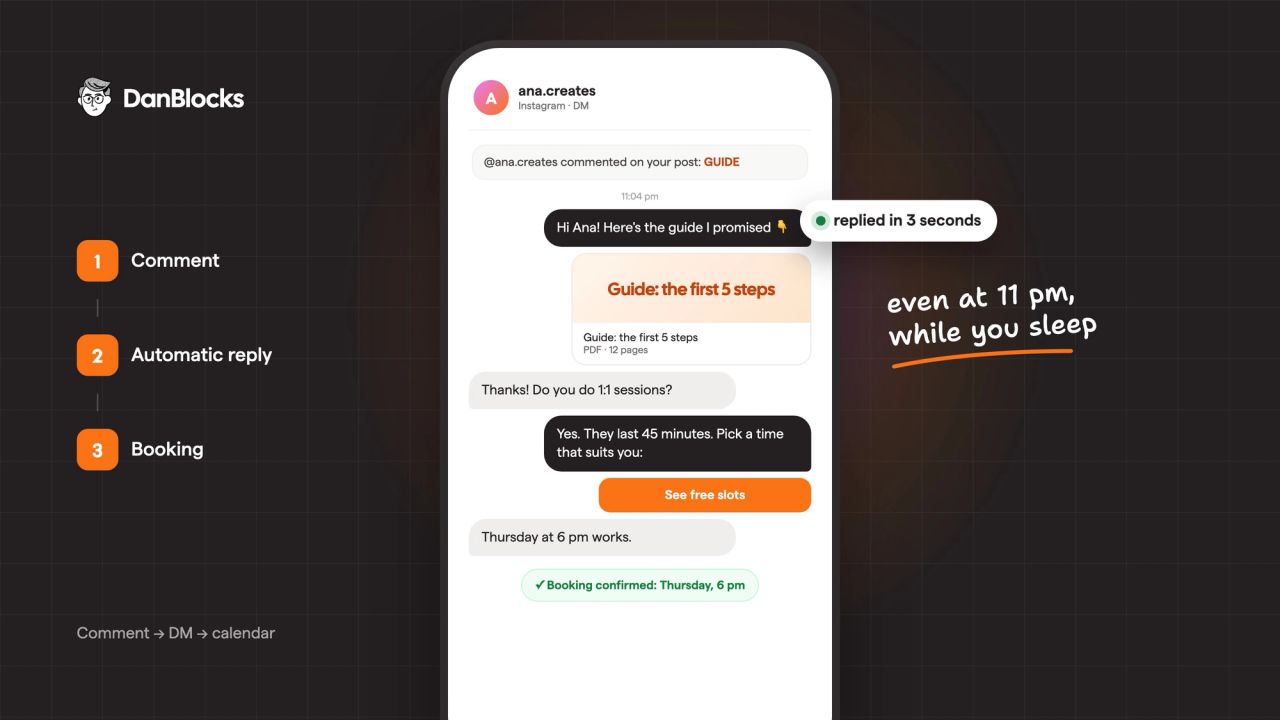
Instagram DM automation means that everyone who comments on a post or messages you privately gets a reply within seconds, at any hour. The reply isn't a generic message: it asks a question or two, finds out what the person is after and takes them to the right next step, whether that's a booking in your calendar, a guide in exchange for their email address or a direct link to the product.
This guide is for anyone who already gets questions on Instagram and can't reply in time:
- businesses: salons, clinics, online stores, services by appointment;
- personal brands: consultants, coaches, trainers, creators selling courses, guides, sessions or collaborations.
The difference matters less than it seems. Either way, people ask the same things at hours when you're offline, and whoever replies first wins the client.
Why reply speed matters
Someone asking "how much is it?" is someone ready to buy. A few hours later, they've often already bought from whoever replied first.
The research backs this up. The InsideSales Lead Response study, covering 5.7 million inbound leads at more than 400 companies, found that conversion is 8 times more likely when you respond within the first 5 minutes than later the same day. And in Sprout Social's August 2026 survey of 2,250 consumers, 68% expect a reply on social media within 24 hours, 24% within one to two hours and 14% in under an hour.
The same survey found that 55% of people would rather send a private message than comment publicly, and 44% name Instagram among the channels they choose when they need help from a brand. In other words, your DMs have become your front desk.
The problem isn't that you don't want to reply. It's that messages arrive at 10 pm, at the weekend or right when you're with a client.
Run the numbers: what you're losing now
The calculation is simple and worth doing on your own numbers:
- Count the questions you get in a week (DMs and comments like "price?", "link?", "still available?").
- Estimate how many came from people who would have bought but left because of the late reply.
- Multiply by the average value of a sale (an order, a session, a course sign-up) and by 4.3 (weeks in a month).
For example: 10 questions a week, 3 lost to a late reply and an average value of 300 lei comes to almost 3,900 lei a month left on the table. And that's before counting the ads you paid for to bring in those messages.
Then there's your time. An hour a day in the DMs answering the same five questions adds up to more than 20 hours a month when you're not selling, creating or resting.
Six situations where automation pays off quickly
| The situation | What the person writes | What happens automatically |
|---|---|---|
| You have a free guide or resource | Comments "GUIDE" on the post | Gets the guide privately and joins your email list |
| You're launching a course, ebook or programme | Comments "IN" on the launch post | Gets the link within seconds, without you sending it one by one |
| You offer consultations or 1:1 sessions | "How much is a session?" | Sees what's included and the price, then picks a time in your calendar |
| You get collaboration requests | "Do you work with brands?" | Gets your media kit and 2-3 questions about budget and timing, so you only see the serious requests |
| You offer services by appointment | "Do you take bookings on Saturdays?" | Sees prices and free slots, then books on their own |
| You run an online store | "Do you have it in M?" at 11 pm | Gets the answer and the product link straight away |
If you recognise at least one of these, you have a clear starting point. You don't need to automate everything at once: start with the situation that brings you the most messages.
Personal brands: what to automate and what to keep for yourself
On a personal brand account, people are writing to you, not to a company. So the rule is simple: automate what's repetitive and keep personal what builds the relationship.
- Automate: the link people ask for dozens of times, the price of a session, the guide promised in a post, the qualifying questions for collaborations, the calendar booking.
- Keep for yourself: replies to stories from people who've followed you for years, negotiating a collaboration, personal or sensitive messages.
Automated messages are written in your voice, with your own phrases, and say openly that they're automated. That way you save time without losing what sets you apart: the fact that there's a real person behind the account.
What automation can and can't do
Automation done properly runs through Meta's official messaging API. That comes with a few rules worth knowing from the start:
- Access is granted from Meta Business, not through your account password. You can withdraw it at any time.
- Automated replies start from the person who messages you. Instagram lets you reply automatically within 24 hours of their last message; after that, a person continues the conversation. That's why the flow has to lead to an action quickly, not rely on "I'll get back to you tomorrow".
- The assistant says openly that it's automated. People don't mind a useful automated reply; they mind being misled.
- You can take over at any time. You or your team can step into any conversation, and the automation can pause for that contact while you're talking.
What a good flow looks like, step by step
A flow that brings in bookings or sales almost always has the same structure:
- The trigger. A keyword in a comment ("GUIDE", "PRICE"), a new message or a click from an ad that sends people to your DMs.
- The first reply, within seconds. Short, in your tone of voice, with what the person asked for or with a question.
- Qualification. One or two questions, not a form: "Which treatment is it for?", "What size do you wear?". The answers decide the next step.
- One clear action. A booking in the calendar, an email address for the guide or a link to the product. One option, not five.
- Handing over to a person. Anything that doesn't fit a scenario comes to you, with the full conversation history.
The contacts collected this way are yours. If you add them to an email list, you can keep the relationship going after the 24-hour window closes, through email automations.
The mistakes I see most often
- Messages that are too long. On a phone, three lines is already a lot. Split the information into steps.
- The robot tone. "Thank you for your message, a consultant will contact you" helps nobody. Write the way you would.
- No way out to a person. If someone doesn't fit the options, they need to be able to reach you.
- Automation without traffic. If you get three messages a month, reply speed isn't the problem. Bring people in first, then automate.
- No measurement. Without numbers you don't know what works and what needs changing.
How to tell whether it's working
Four numbers tell you almost everything, month after month:
- Conversations started: how many people entered the flow.
- Leads: how many left an email or phone number, or answered the qualifying questions.
- Bookings or sales: how many reached the final action.
- Response time: it should be a few seconds for everything automated.
If you send people to your website, add UTM parameters to the links so sales show up correctly in Google Analytics. If you run ads that send people to your DMs, leads can be measured in both Meta and Google Ads; a proper technical setup connects it all.
How we get started
From you, it takes three things: a call, access in Meta Business and approval of the messages.
- A 20-minute call. You show me what you get in your DMs and what you want to achieve.
- The plan. I suggest the automations with the biggest impact and send you the messages for approval.
- Setup. I get access through Meta Business, without your password, and connect everything to your calendar, email or store.
- Launch and report. We test together, I follow the first real conversations and show you the results every month.
The automations go live within 10 working days of receiving access and the approved messages. The details are on the DM automation page.
Frequently asked questions
Does Instagram allow message automation?
Yes, as long as it uses Meta's official messaging API. What's not allowed are apps that log in with your password and pretend to be a person: they break Instagram's rules and put your account at risk.
Do I have to give anyone my Instagram password?
No. Access is granted from Meta Business, at page and account level, and you can withdraw it at any time without changing your password.
Can I take over the conversation whenever I want?
Yes. You or your team can step into any conversation at any time, and anything that doesn't fit a scenario comes to you with the full history.
I don't have many followers. Is it worth it?
What matters is how many people message or comment, not how many follow you. If you only get a few messages a month, you have more to gain from traffic first: posts, ads or collaborations.